For Lightroom and Photoshop workflows
Merge RAW brackets. Keep your editing workflow.
Create editable HDR DNG files from supported camera RAW brackets on iPhone, iPad, or Mac. Intended file-based workflows include Adobe Lightroom, Lightroom Classic, and Adobe Photoshop through Adobe Camera Raw.
Prepare a single bracket or use Pro to review suggested groups and merge multiple scenes. Compatibility depends on the camera, DNG content, operating system, and editor version.
Start free with supported single-bracket merges. Pro adds batch processing and larger brackets.

iOS and iPadOS 18 or later; macOS 15 or later on Mac computers with Apple silicon.
A focused path from files to DNG
Import. Review. Merge. Continue.
Import
Select supported RAW files from Files, a supported file provider or connected storage.
Review
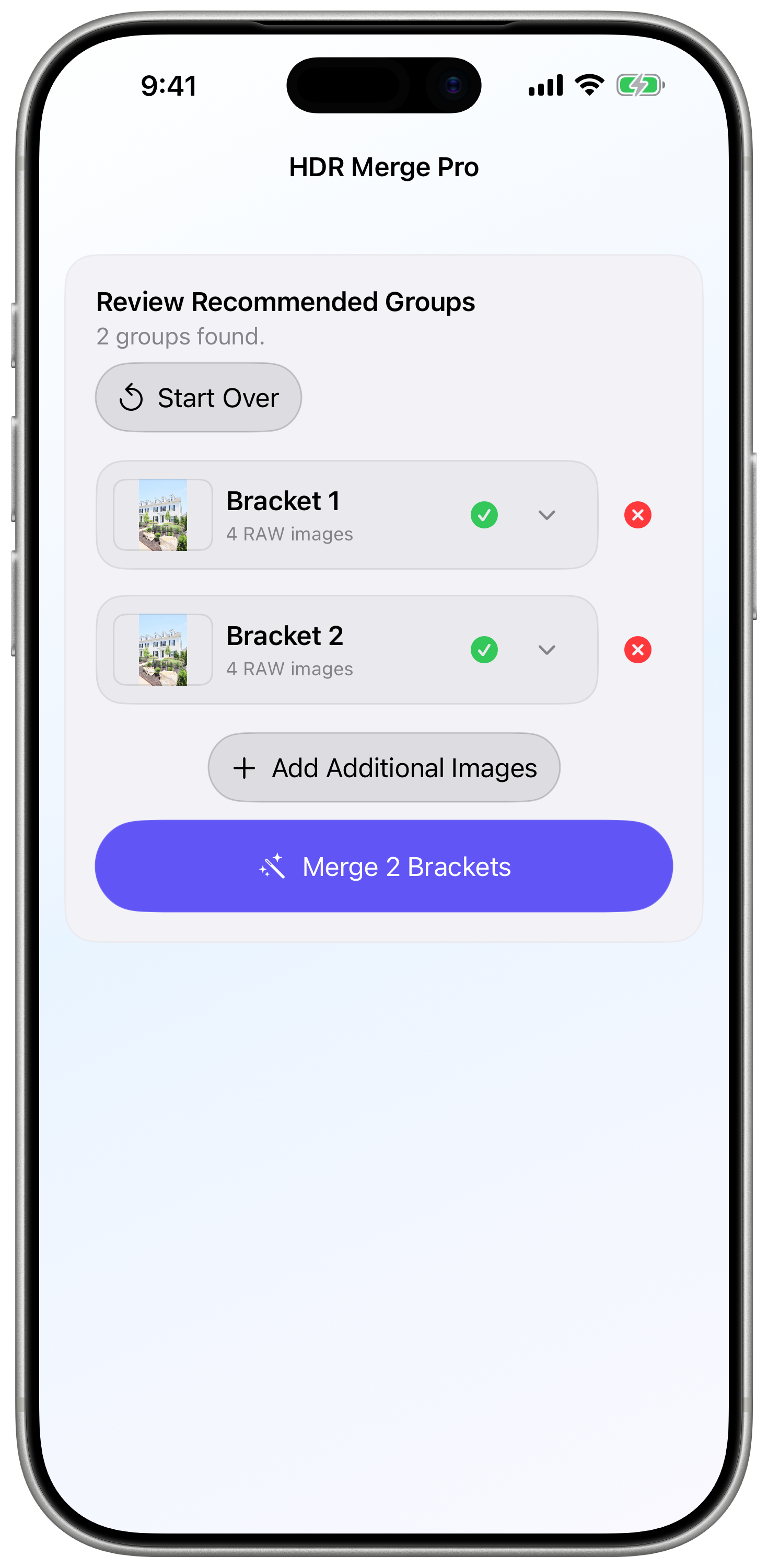
With Pro, inspect the suggested groups and adjust them before processing. You remain responsible for confirming that the exposures belong together.
Merge
Process the batch with overall and per-group progress. Completed results remain available if another group cannot be completed.
Continue
Save editable HDR DNG files and finish your images in a compatible editor. The merge is one step toward delivery, not a replacement for your finishing workflow.
Built around the job at hand
Built for the repetitive part of bracketed shoots.
Review suggested groups.
Let the app propose how your imported photos belong together, then check and correct the groups before merging.
Process more than one scene.
Pro brings multiple brackets into one batch workflow, with clear progress instead of a repeated single-group routine.
Continue your RAW-editing workflow.
Save an editable HDR DNG for continued work in a compatible RAW editor. Intended workflows include Lightroom and Photoshop through Camera Raw. The merge is a starting point, not a finished photograph.
Merge locally.
Processing runs on your device without an HDR Merge Pro account or an upload to a processing service. Cloud file providers and purchases can still require internet access.
Choose the workflow that fits the shoot
Try your own bracket. Add Pro for the shoot.
| Capability | Free single-bracket workflow | Optional Pro subscription |
|---|---|---|
| Workflow | One bracket at a time | Multiple brackets in a batch |
| Supported bracket size | Free single-bracket range | Larger supported brackets |
| Suggested batch groups and review | Not part of the advertised free workflow | Included |
| Editable HDR DNG output | Included | Included |
| Merge processing | Local | Local |
| Purchase requirement | No subscription for the free workflow | Auto-renewable monthly subscription |
The current Pro price and billing period are shown in the app before you subscribe. Single-bracket merging remains available without Pro within the free workflow’s limits. Manage or cancel Pro through your Apple Account subscription settings.
Supported RAW formats
Check your camera workflow, not just the file extension.
HDR Merge Pro accepts supported camera-original RAW files, including compatible CR2/CR3, NEF, ARW and Bayer DNG inputs. Support depends on the camera model, recording mode and underlying RAW structure. Check the format guidance before relying on a new camera workflow.
Canon
Compatible single-image Bayer RAW files using CR2 or CR3.
Nikon
Compatible single-image Bayer NEF files, excluding High Efficiency encodings.
Sony
Compatible single-image Bayer RAW files using ARW.
Camera-original DNG, including DJI
Many DJI cameras and aircraft save camera-original RAW photos as DNG. Compatible files must contain a supported single-image, three-color, 2×2 Bayer mosaic. Rendered, linear, monochrome, multi-image, and renamed non-RAW files are rejected.
Questions before you begin
Keep the next step clear.
What does HDR Merge Pro create?
An editable HDR Digital Negative (DNG) from supported RAW exposures of the same scene. It is intended for continued editing, not automatic delivery of a finished listing photograph.
What is free, and what needs Pro?
Start free with supported single-bracket merges. Pro adds batch processing, suggested grouping with review, and larger brackets. The current Pro price and billing period are shown in the app before purchase.
Does the app replace my RAW editor?
No. HDR Merge Pro prepares an editable HDR DNG from your supported RAW brackets. Intended file-based workflows include Adobe Lightroom, Lightroom Classic, and Photoshop through Camera Raw. Continue color adjustments, perspective correction, retouching and delivery in your editor. Compatibility varies by editor version and DNG content.
Are photos uploaded for processing?
Merge processing happens locally on your device. HDR Merge Pro does not require an account or a photo upload for processing. A cloud file provider may still transfer the originals to your device, and purchases may require a network connection.
Private by design
Your photos stay on your devices.
HDR Merge Pro processes selected files locally. The app has no accounts, analytics, developer-operated cloud processing, or user tracking.
iPhone · iPad · Mac with Apple silicon
Put your next bracket to work.
Start with a supported single bracket. When you are ready to process multiple scenes, Pro adds the batch workflow.
iOS and iPadOS 18 or later; macOS 15 or later on Mac computers with Apple silicon.